Best AI Note-Takers for Meetings in 2026: Top 10 Tools Compared
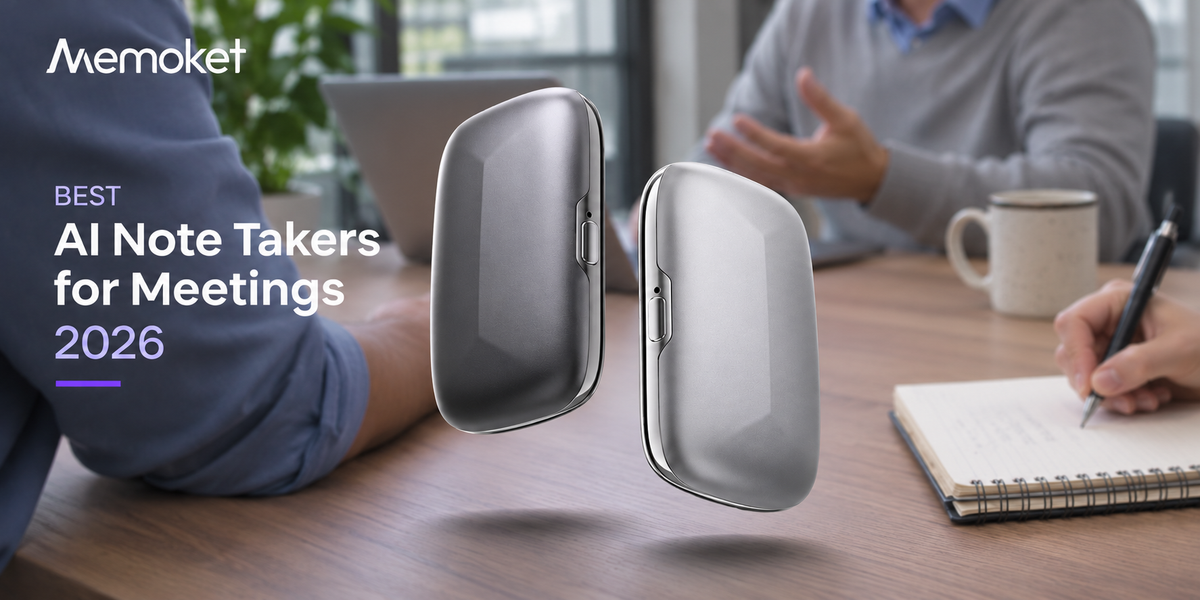
Memoket Gem is the lightest AI wristband that records conversations with the press of a button. It leads this list because it works for every kind of meeting: in-person, on a call, or walking between floors. It doesn't send a bot into your Zoom, it costs less per year than most monthly subscriptions, and it keeps your audio on-device so you stay in control. If you need a note-taker that travels with you, that's your answer. If you live entirely on video calls and want team-level features, the software options below are worth a close look.
This guide covers ten tools: four hardware recorders and six software apps. Every product here has been categorized by what it actually does best, not just what its landing page claims.
Quick pickFind your fit in 30 seconds
| Your situation | Best choice |
|---|---|
| You move around: in-person meetings, coffee chats, site visits | Memoket Gem |
| You live on Zoom but don't want a visible bot in the room | Granola |
| You need phone call recording without speakerphone | Pocket or Plaud NotePin |
| Your team needs CRM-synced summaries after every sales call | Fireflies.ai |
| You want unlimited free recordings and don't care about hardware | Fathom or tl;dv |
| You want detailed analytics on talk time and engagement | Read.ai |
Where Memoket Gem wins
The best AI note-takers for meetings in 2026
01 — Best Overall
Memoket Gem

Best for Every kind of meeting: in-person, hybrid, online, and walking between rooms
Most AI note-takers make a silent assumption: that your meetings happen at a desk, in a Zoom window, with your laptop open. Memoket Gem doesn't. It weighs ~11g (0.4 oz), wraps around your wrist, and starts recording with a single button press. When you walk into a client office, a factory floor, or a coffee meeting, it records just the same. When you get back to your desk, the transcription and AI summary are waiting in the app.
Battery runs 20 hours of continuous capture on a single charge, with 30 days of standby. That's enough for a full day of back-to-back meetings without touching a charger. Transcription covers 153 languages including regional variants. The Starter plan, included free with hardware purchase, gives you 300 transcription minutes per month with MemoChat, integrations, and templates. The Pro plan adds 1,500 minutes per month, premium AI models, and proactive insights for $99.96 per year (less than $8.50 a month).
Memoket Gem connects to Claude Desktop and Cursor via MCP, plus Notion, Slack, Gmail, and Google Calendar. So your meeting context flows into the AI tools you already use. IPX5 water resistance means it handles sweat and rain, and four wearing modes (co-wear alongside Apple Watch, solo wrist, clip, and lanyard) mean you're not locked into one setup.
A red indicator light on the device signals that recording is in progress. This is a deliberate design choice: Gem is built to be used openly, not secretly. Everyone in the room can see the light. Most people notice it briefly and move on.
02 — Best Dedicated Hardware Recorder
Plaud NotePin

Best for Users who want a focused, single-purpose recording device with phone call support
Plaud NotePin clips to your phone, attaches to a lanyard, or slides onto a wristband. Its speaker-independent voice print recognition separates speakers in a room without asking them to introduce themselves — useful in multi-person meetings where you need a clear attribution of who said what. It captures phone calls via physical contact with the back of your phone, so speakerphone isn't required.
Hardware starts at $159. The Starter plan includes 300 transcription minutes per month. Plaud has built a solid template library for different meeting types, which helps if you switch contexts often between client calls, internal syncs, and solo voice memos. The companion app supports iOS and Android.
03 — Best for Phone Call Recording
Best for Capturing phone calls without speakerphone and in-person conversations via a MagSafe-mounted device
Pocket is a MagSafe clip-on device that snaps to the back of your phone. Its distinctive feature is a contact microphone that picks up vibrations directly from your phone's speaker during a call, so the other person's voice is captured even when you're holding the phone normally. Its two studio microphones handle in-person conversations up to 15 meters away.
At 52g it's the heaviest hardware option on this list, though it's designed to ride on your phone rather than your body. The 64GB onboard storage and four-day battery mean it can handle heavy recording schedules before needing to sync. The free plan includes unlimited standard-accuracy transcription, which is a genuinely strong free tier for a hardware device. Pro costs $19.99 per month and adds highest-accuracy transcription, speaker name detection, unlimited Ask Pocket AI queries, and sync with Notion, Google Drive, and OneDrive. Pocket also supports MCP, connecting your recordings to Claude Desktop and Cursor.
04 — Best Budget Hardware Option
Bee Eclipse

Best for Budget-conscious users who want hardware recording without a large upfront cost
At $99.99, Bee Eclipse is the lowest-cost hardware recorder on this list. It clips to the back of your phone via MagSafe, lasts 21-plus days on a single charge, and captures both in-person audio and phone calls via its VPU microphone. iOS and Android are both supported. The Pro plan is $11.99 per month.
Bee Eclipse's privacy approach is deliberate: audio is processed and then deleted. Only the transcript and summary are stored. For users who want the confidence of knowing no audio file exists after the fact, this is a genuine differentiator.
Software and app-based tools
05 — Best Bot-Free Desktop App
Granola

Best for Mac and Windows users who want clean AI notes from any video platform without sending a bot into the meeting
Granola runs quietly in the background and captures your computer's audio. It works with Zoom, Google Meet, Microsoft Teams, Webex, and virtually any other platform, because it doesn't join your meeting as a participant. No one in the room sees a bot appear in the participant list. It transcribes in real time, then generates structured notes with action items. After processing, the audio is deleted and only the text is kept.
Speaker identification works reasonably well for small groups. The Business plan at $14 per user per month unlocks unlimited meeting history, shared team folders, and MCP support, which connects your Granola notes to Claude Desktop and Cursor. The free plan covers basic use with limited history. Granola is SOC 2 Type 2 certified.
06 — Best for Meeting-Heavy Teams
Otter.ai

Best for Teams with high meeting volume who want automated real-time transcription and meeting summaries across Zoom, Teams, and Google Meet
Otter.ai is one of the most established names in meeting transcription. OtterPilot, its automated meeting bot, joins your Zoom, Teams, or Google Meet calls and transcribes in real time. Notes and action items appear in the app before the call ends. It integrates with Salesforce, HubSpot, and other CRMs for automatic logging, and teams can search across all meeting transcripts in one place.
The free plan includes 300 transcription minutes per month. Pro plans unlock up to 1,200 minutes per month. Business plans add more minutes per user and admin controls for teams managing multiple users across a shared workspace.
07 — Best for Sales Teams Using CRM
Fireflies.ai

Best for Sales and customer success teams who need meeting notes automatically pushed into Salesforce, HubSpot, or Pipedrive
Fireflies.ai joins your video calls as a bot, transcribes the conversation, and generates a structured summary with topics, action items, and sentiment analysis. Its CRM integrations are more comprehensive than most competitors: it pushes directly into Salesforce, HubSpot, Pipedrive, and Zoho, with native field mapping so the right data lands in the right place. Topic tracking lets managers filter transcripts by competitor mentions, pricing objections, or any keyword they define.
The free plan stores up to 800 minutes of transcripts. The Pro plan at $10 per user per month (billed annually) removes the storage cap and adds advanced search and AI summaries.
08 — Best Free Option
Fathom
Best for Individuals who primarily use Zoom and want unlimited free recording, transcription, and AI summaries without a paid plan
Fathom's free tier is unusually generous: unlimited recordings and transcriptions for Zoom calls, with AI-generated summaries and action items included at no cost. During a call, you can highlight moments in real time so the AI flags them in the summary. The free individual plan has no meeting or minute limits, which makes it a compelling option for anyone who lives in Zoom and doesn't need team features.
The Team Edition at $19 per user per month adds multi-platform support beyond Zoom, shared playlists, CRM integration, and team dashboards. For individuals, the free plan is genuinely usable with no upsell pressure.
09 — Best for Searchable Recordings
tl;dv

Best for Teams that need to clip, share, and search across a large library of recorded meetings
tl;dv (too long; didn't view) is built around the idea that recordings are only useful if people actually go back to them. Its clip tool lets you cut short segments from long recordings and share them directly, without anyone watching the whole call. Multi-meeting search lets you query keywords or topics across your entire call library in one prompt. Teams use it to surface product feedback, track competitor mentions, or find moments from past calls without replaying them.
The free plan includes unlimited recordings. The Pro plan starts at $18 per user per month (billed annually) and adds AI meeting reports, multi-meeting intelligence, and CRM integrations. It works with Zoom, Google Meet, and Microsoft Teams.
10 — Best for Meeting Analytics
Read.ai
Best for Managers and teams who want detailed data on meeting quality, talk time, and engagement beyond just a transcript
Read.ai goes deeper on meeting analytics than any other tool on this list. After each call, it scores meeting quality, tracks talk-time distribution across participants, measures engagement, and flags when conversations drift off-agenda. For managers running 1:1s or team leads who want to improve meeting culture, the data layer is genuinely useful. It supports Zoom, Microsoft Teams, and Google Meet, and handles multi-language calls.
Read.ai is priced for teams: the standard plan runs $29.75 per user per month. That's the highest subscription cost on this list, and it makes less sense for individuals who just want clean notes.
Side-by-side
All 10 tools compared
| Tool | Hardware price | Subscription (paid) | Free tier | Meeting bot | Works offline | Phone calls |
|---|---|---|---|---|---|---|
| Memoket Gem | $199 | From $99.96/yr | 300 min/mo | No | Yes | By design, no |
| Plaud NotePin | $159–169 | From ~$10/mo | 300 min/mo | No | Yes | Yes |
| $129 | $19.99/mo or $239.88/yr | Unlimited std. | No | Yes | Yes | |
| Bee Eclipse | $99.99 | $11.99/mo | Limited | No | Yes | Yes |
| Granola | None | $14/user/mo (Business) | Limited history | No | Partial | No |
| Otter.ai | None | From ~$10/mo | 300 min/mo | Yes | No | Partial |
| Fireflies.ai | None | From $10/user/mo | 800 min storage | Yes | No | No |
| Fathom | None | $19/user/mo (Team) | Unlimited (Zoom) | Yes | No | No |
| tl;dv | None | From $18/user/mo | Unlimited recordings | Yes | No | No |
| Read.ai | None | $29.75/user/mo | Limited | Yes | No | No |
How to decide
Hardware vs software: which one is actually right for you?
The divide between hardware and software note-takers isn't just about form factor. It maps onto a fundamental difference in how you work.
Hardware recorders like Memoket Gem, Plaud NotePin, Pocket, and Bee Eclipse are independent of your laptop and your video call. They're right if any of your important meetings happen away from your desk: in-person client visits, office walkarounds, networking events, or commutes where you're thinking out loud. They're also right if you attend a lot of calls where sending a bot would be uncomfortable, or if you simply want your recordings stored locally on a device you control.
Software bots like Otter.ai, Fireflies.ai, Fathom, tl;dv, and Read.ai are right if you live in a fixed video call setup and want seamless automation. They require no physical device, join your calls without you doing anything, and push notes wherever your team already works. The trade-off is that they're visible to everyone in the meeting, they don't work for in-person conversations, and they depend on your network connection.
If you're unsure: think about where your most important conversations happened in the last two weeks. If more than half happened away from your laptop, a hardware recorder will serve you better. If they all happened on-screen, any of the software options will get the job done. But if you want to be covered on all fronts, Memoket Gem is the best option right now.
Common questions
FAQ
What is the best AI note-taker for in-person meetings?
Memoket Gem is the strongest option for in-person meetings. It weighs ~10g, starts recording with a single button press, and works completely independently from your phone or laptop. Plaud NotePin and Pocket also capture in-person audio well and are worth comparing if phone call recording is a priority for you.
What is the best AI note-taker that doesn't send a bot into the meeting?
Any hardware recorder (Memoket Gem, Plaud NotePin, Pocket, Bee Eclipse) or Granola. All of these capture audio without joining as a meeting participant. Granola specifically is the best software-only option for bot-free recording, since it captures your computer's system audio instead of joining the call.
What is the best free AI note-taker for meetings?
Fathom is the best free option for Zoom users: unlimited recordings and transcriptions with no meeting cap. tl;dv also has an unlimited-recording free plan. If you want hardware, Memoket Gem's Starter plan (included with hardware) gives you 300 transcription minutes per month at no ongoing cost.
Can AI note-takers capture phone calls?
Plaud NotePin and Pocket both capture phone calls via a contact microphone that reads vibrations from your phone's speaker during a call. Bee Eclipse does so via its VPU microphone. Memoket Gem does not silently capture phone calls; this is a deliberate choice around consent. If you want to capture a phone call with Memoket Gem, put the call on speakerphone and let the other party know.
What is the cheapest AI note-taker for meetings?
For software: Fathom and tl;dv both have genuinely unlimited free plans. For hardware: Bee Eclipse starts at $99.99. Memoket Gem's one-time hardware cost of $199 is higher upfront, but the Starter plan is free with purchase and includes 300 minutes per month of transcription. Compared to a $20 per month software subscription, Memoket Gem reaches break-even around the one-year mark.
What is the best AI note-taker for sales calls?
Fireflies.ai is the strongest option if automatic CRM logging is the priority. It maps transcript data directly into Salesforce, HubSpot, Pipedrive, and other CRMs with minimal setup. If your sales calls also happen in-person, Memoket Gem covers both in-person and video call formats in one device and connects to Notion and Slack out of the box.
Start capturing every meeting
Memoket Gem records conversations wherever they happen. One press. No bot. No subscription required to get started.
Get Memoket Gem

